

This is how the site rendering process works in the bluetronix CMS.
With each page request, the bluetronix CMS goes through several processing steps. In this tutorial, you will learn about the complete rendering process and when security checks are performed, PHP scripts are executed, layout variables are replaced, and the final HTML pages are generated.
1. Load security scripts
At the start, the bluetronix CMS loads the security-related scripts. These include Secure Check, the verification of call count, the preparation or verification of MySQL parameters, and the analysis of GET and POST parameters.
Checks that do not require a database connection are already performed at this point.
2. Load module configuration
If available, the file /bx_Mod/config_own.php is loaded. Scripts and configuration variables defined therein are thus available from the beginning of the rendering process.
Start session
The CMS starts the PHP session with @session_start();. Three session variables are particularly important: $_SESSION["S_User"] for the CMS user or edit mode, $_SESSION["S_Language"] for the current language, and $_SESSION["Web_User"] for the user of a frontend login.
Load page parameters
The CMS then reads information about the current call from the server variables. $domain receives the domain name from $_SERVER["SERVER_NAME"], $FileParameter the request path including GET parameters from $_SERVER["REQUEST_URI"], and $file the executed file path from $_SERVER["PHP_SELF"].
$ReferURL contains the value of $_SERVER["HTTP_REFERER"], if it was transmitted. It can be used, for example, when reloading frames or page areas.
Establish database connection
The CMS automatically establishes the database connection. After that, the CMS database tables are available for further checks and for loading the page content.
Recheck GET and POST parameters
After establishing the database connection, the CMS calls SECUREGetPost();. The passed GET and POST parameters are checked again and adjusted if necessary. Now checks that require database information are also possible.
Domain, edit, and language redirects
Depending on the CMS configuration, the requested domain, the edit mode, the selected language, and the call parameters, a redirect may occur. Possible targets are the main domain, the edit domain, as well as language-dependent domains or URLs.
HTTPS redirect
If the website was accessed without HTTPS, a redirect to the SSL or HTTPS version of the page occurs.
Load central PHP scripts
The CMS now loads its central PHP functions. These include, for example, BlueSMTPMail() for sending emails and BlueFormSend() for processing forms. Other central functions are also included.
Load page data from 00_site
The data of the requested page is read from the database table 00_site. During this process, CMS variables such as $Template are determined.
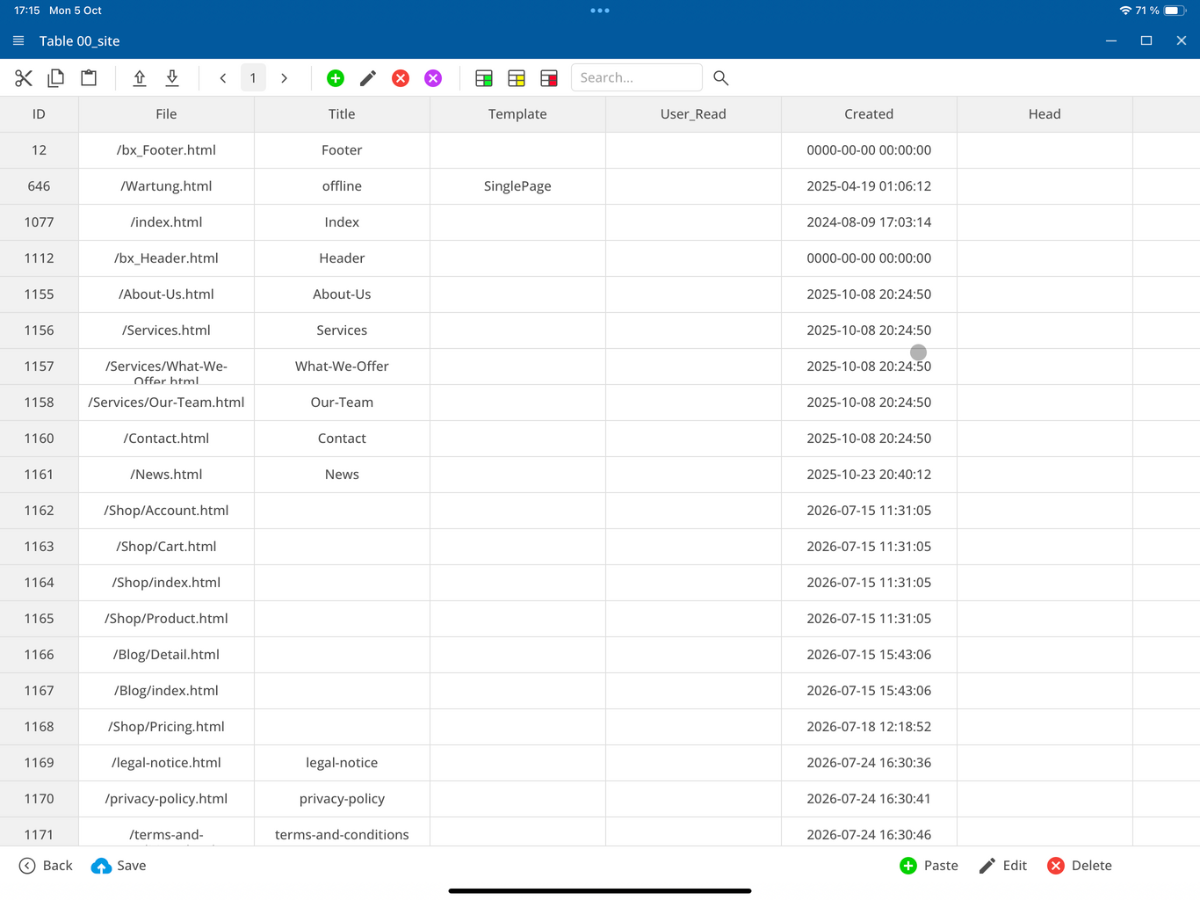
Additionally, $LayoutHTML and $SitePHP are initialized. $LayoutHTML later contains the complete HTML layout, while $SitePHP contains the PHP code that directly corresponds to the called page.
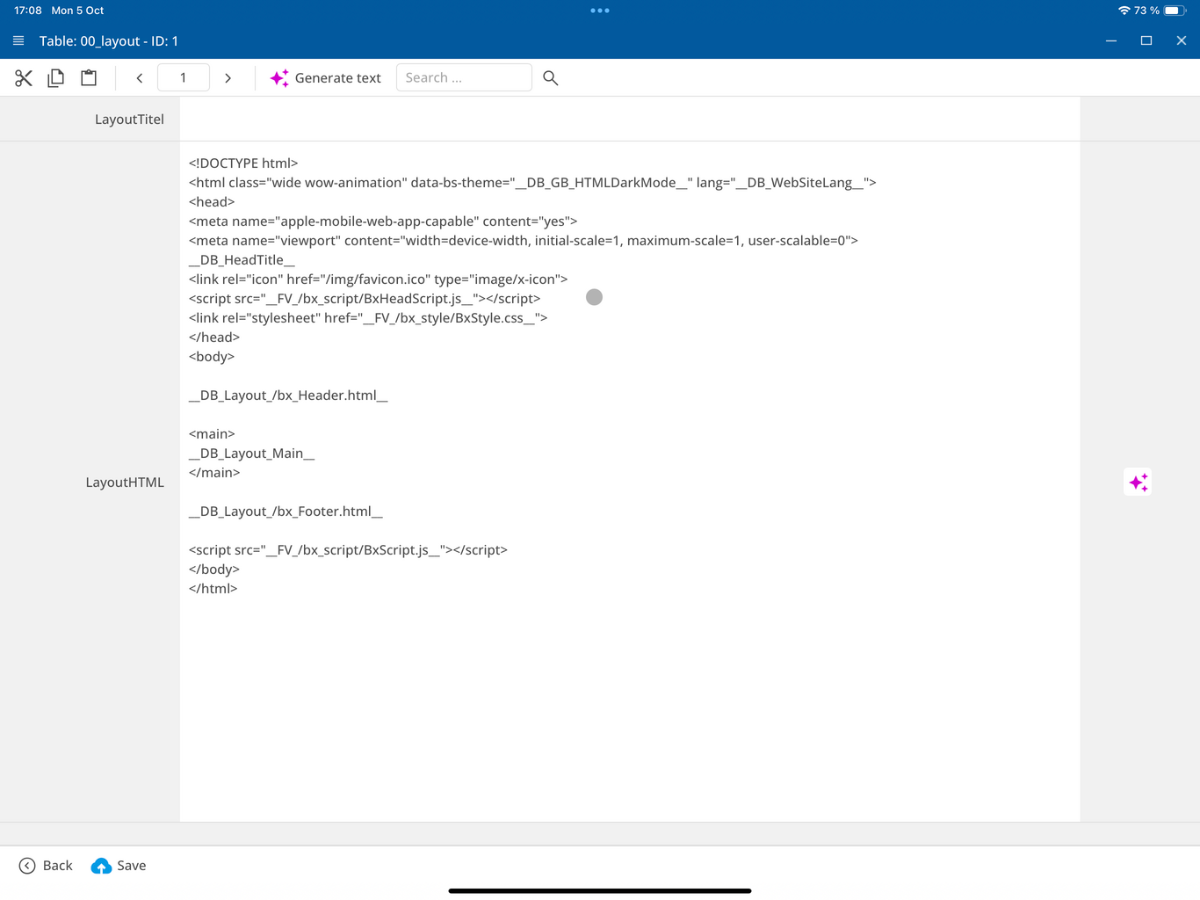
Load layout from 00_layout
The layout assigned to the page is loaded from the database table 00_layout and forms the basis for further processing in $LayoutHTML.
Set language-dependent JavaScript files
If language-specific files are available, the CMS can replace the standard files BxScript.js and BxHeadScript.js with suitable language variants, such as BxScript_de.js or BxScript_en.js.
The file tags __FV_/bx_script/BxScript_own_min.js__ and __FV_/bx_script/BxHeadScript_own_min.js__ are adjusted in the layout.
Generate header and dynamic content
Now dynamic content is generated and page-specific PHP scripts are executed. DynMenue() generates dynamic menus, IncludeModul() includes configured modules, and EditMARK() sets the editing markers of the CMS.
With eval($SitePHP), the PHP code of the current page is executed; eval($IncludePHP) executes included PHP scripts.
Set change parameters for CSS and JavaScript
For CSS and JavaScript files, a change parameter is set. This allows the browser to load a new version of updated files instead of using an outdated file from its cache.
For example, a file reference like /css/style.css can result in a call with a version parameter like /css/style.css?v2026....
Set dark or light mode
The CMS reads the configured display mode from /bx_style/BxSource/CSSEditDarkLight.bx. Depending on the file content, the dark or light mode is set in the layout.
Set module configuration variables in layout
The module configuration from /bx_Mod/config_own.php is applied to the layout. For example, if the shop, search, login, or translation module is disabled, the corresponding controls can be automatically hidden.
For this, layout markers like __DB_GB_DesktopIconBasket_Display__, __DB_GB_DesktopIconSearch_Display__, __DB_GB_DesktopIconLogin_Display__, or __DB_GB_DesktopIconLang_Display__ are replaced with none.
Remove remaining placeholder tags
Non-replaced CMS placeholders will be removed from the finished HTML. This includes markers following the patterns __DB_...__ and __ST_...__ as well as the designated internal xxx comment markers.
Remove HTML comments
The CMS then removes HTML comments from $LayoutHTML. Thus, unnecessary comment text is not delivered to the browser.
Perform language translation
If $_SESSION["S_Language"] is not equal to $GBMainLang, the marked texts are translated into the currently used language. The translations come from the database table Translation.
If a required text is not yet present there, a new entry is created in Translation. The CMS identifies translatable content based on the markers My Text and .My Text.
Replace image calls with IMG.pl
Image calls and image crops via IMG.pl are replaced by previously created or optimized image files. This allows the finished HTML page to directly access these image variants.
Output finished page
After processing is complete, $LayoutHTML is output to the browser with the content type text/html; charset=utf-8, for example, via print $LayoutHTML;.

For non-activated or internal domains, the output is marked with noindex, nofollow so that these pages are not indexed by search engines.
Write cache
After the page is generated, the CMS can store the finished page in the cache. The condition is that no S_User is logged in, the page is not in edit mode, and caching is enabled for this page.
On subsequent calls, the saved HTML page can be used without executing the full rendering process again.
FAQ
what customers often ask us
What is the site rendering process?
This tutorial refers to the processing steps by which the bluetronix CMS generates the final HTML page from page and layout data and outputs it to the browser.
What security checks are performed before the database connection?
Before the database connection, Secure Check, the check of the call count, the preparation of MySQL parameters, and the analysis of GET and POST parameters are carried out.
When is the module configuration loaded?
The file /bx_Mod/config_own.php, if it exists, is loaded before the session starts and before the database connection is established.
What are S_User, S_Language, and Web_User used for?
S_User refers to the CMS user or edit mode, S_Language the current language of the website, and Web_User the user of a frontend login.
From which database tables do page and layout originate?
The page data is loaded from 00_site. The corresponding layout is read from 00_layout and processed into $LayoutHTML.
When is the PHP code of a page executed?
When generating headers and dynamic content, the page-specific code is executed via eval($SitePHP), and included PHP code via eval($IncludePHP).
When are language-dependent JavaScript files used?
If suitable language variants are available, BxScript.js and BxHeadScript.js can be replaced by the corresponding language-specific files.
How is the dark or light mode determined?
The CMS reads the file /bx_style/BxSource/CSSEditDarkLight.bx and sets the display mode in the layout based on its content.
When are texts automatically translated?
If the current language deviates from $GBMainLang, the marked texts are translated based on the entries in the Translation table.
Under what conditions is the finished page cached?
The cache can be written if no S_User is logged in, the page is not in edit mode, and caching has been enabled for this page.