

Publish or hide records in the blog – this is how you control visibility
In this tutorial, you will learn how to make blog posts visible or invisible, check the public view, and prepare content specifically before publishing.
Publish records or restrict them from the public
In this tutorial, you will learn how to specifically publish records – using a blog as an example – or restrict them from the public.
When you insert a page section from the blog module, you will see various blog entries. All records are public when the green arrow is visible.
To check the public view, click on the Desktop View, the icon with the stripes at the top right. Then scroll to the blog section: Here you can see that all articles that previously had a green arrow are publicly visible.
In the public view, no quick edit buttons are visible. A cookie notification appears at the bottom.
Deactivate articles for the public
Switch back to editing mode and scroll to your blog. Set the desired article to deactivated for the public. This is indicated by the pause button.
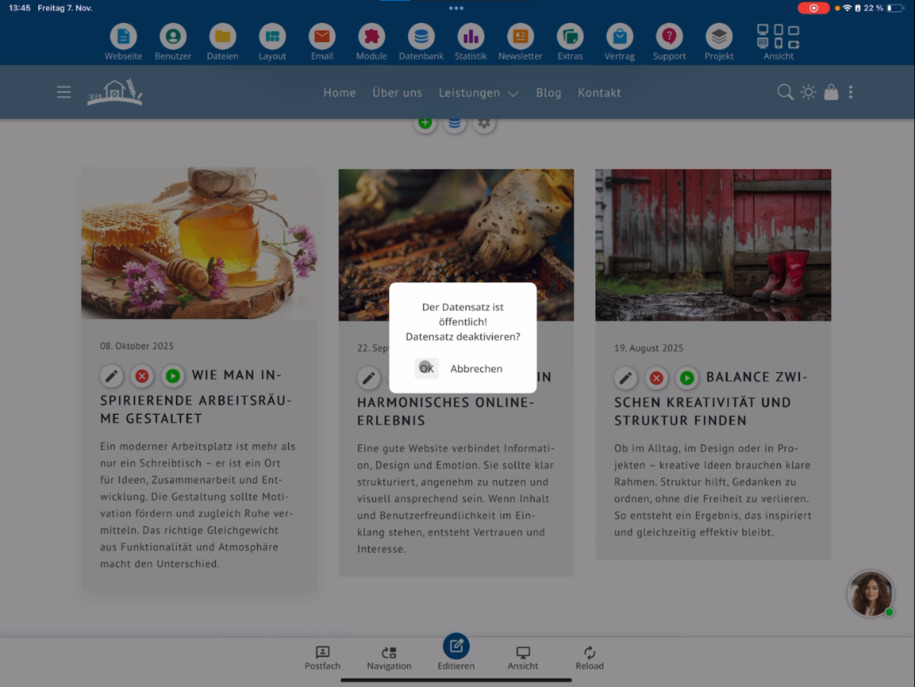
Since you are still in editing mode, you can still see the deactivated article there.
To check, go back to public view ⯈ scroll to the blog. Now the previously deactivated entry is missing.
Re-publish articles
To make an article publicly visible again, simply click the pause button again and activate it for the public.
With this function, you can prepare articles and only publish them when they are truly finished.
FAQ
what customers often ask us
How can I make a blog article visible to the public?
If an article should be published, just click the pause button, which activates it for the public. The green arrow then indicates that the entry is publicly visible.
How do I check which articles are publicly visible?
Click on Desktop View, the icon with the stripes at the top right. In the public view, you can see exactly which blog articles are visible to visitors.
How can I deactivate an article for the public?
Scroll to the desired blog article in editing mode and click the pause button to deactivate it for the public. It will then no longer be visible in the public view.
How do I check if a deactivated article has been hidden?
Switch back to Desktop view ⯈ scroll to the blog. The disabled article will no longer be displayed there.
How do I make a previously disabled article visible again?
Click the pause button and reactivate the article for the public. It will then reappear in the public view.
What is the function for blocking and publishing suitable for?
It allows you to prepare blog articles in peace and publish them only when they are finished. The buttons help you flexibly control visibility.