

Handoff to the customer
After setup and website acceptance, the customer receives their admin access, reviews all content and legal information, and publishes their website independently through the bluetronix CMS.
Objective of the Tutorial
The website is fully set up and has been checked before the handover. You will learn how the handover to the client is completed and how the client publishes their website after their own final review.
Important: The technical completion and the public release are two different steps. After the transfer of admin access, the client checks the provided content and makes the website publicly accessible themselves.
1. Prepare the website for handover
Before the handover, the bluetronix CMS is fully prepared for the client project. Depending on the task, the layout has been set up, a new website created, or the existing website of the client imported. All agreed functions and content have been tested.
Use the separate 'Website Acceptance Checklist' for this purpose. It includes, among other things, domain and publication, email, content and presentation, SEO/GEO, image rights, forms, CMS functions, as well as the necessary modules and legal information.
The technical review by the service provider does not replace the final content and legal review by the client.
2. Transfer admin access to the client
After the setup is complete, the client receives their admin access to the bluetronix CMS. They can log in, review their website, and manage the settings assigned to them.
The client should review the entire website again from their own perspective. This applies even if an existing website has been imported or the content has already been agreed upon.
3. Check content, image rights, and legal texts
Before the client publishes the website, they should check that all imported and newly inserted content is correct and that they have the necessary rights to the used texts, images, and other files.
It is especially important to check the details in the Imprint, in the Privacy Policy, and – if required for the project – in the General Terms and Conditions (GTC). The information must be relevant to their company and the functions actually used.
All other legal and content requirements must also be checked before approval. If there are any open questions regarding legal obligations, the client should clarify them with their legal advisor if necessary.
4. Open the 'Publish Website' function
After the client has completed their review, they open the Publish Website function in the CMS. The Website Access window then appears. The sections Blocking and Publication are available there.
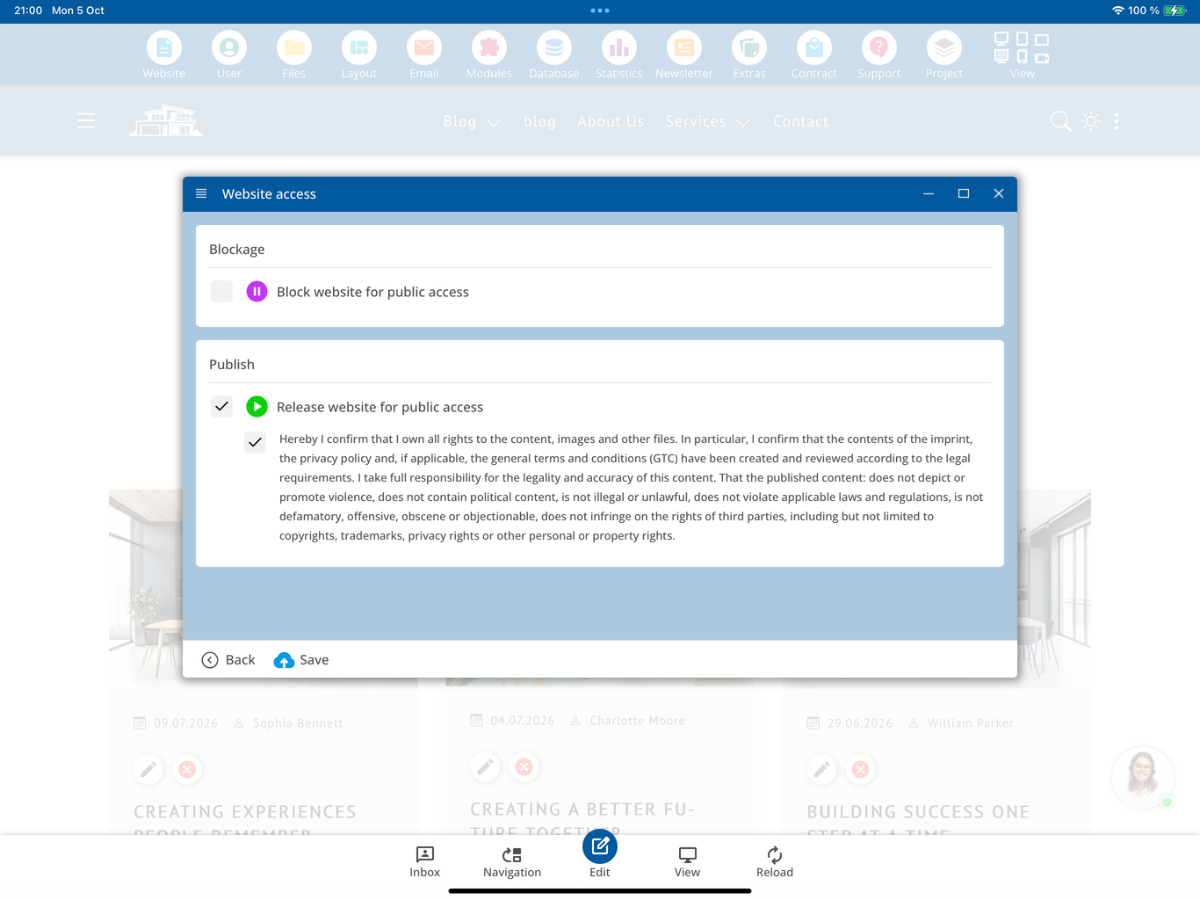
In the Blocking section, the website can be locked for public access. Under Publication, the client can release the website for public access.
5. Confirm publication and declaration
To release, the client selects Release Website for Public Access. They then carefully read the associated declaration and only confirm it if the conditions mentioned there are met.
With this declaration, the client confirms, according to the displayed text, among other things, that they hold the necessary rights to their content, have checked the provided legal information, and take responsibility for the accuracy and legality of the published content. The declaration also includes provisions regarding prohibited content and the respect of third-party rights.
The declaration must not be confirmed unchecked. The client must ensure that their information is complete and that the content they publish conforms to contractual and legal requirements.
6. Release the website by clicking 'Save'
After the client has selected publication and confirmed the required declaration, they click on Save. This applies the release setting and makes the website publicly accessible to visitors according to this setting.
Subsequently, the client should visit the published website via its public domain and check once again whether it is accessible to visitors as intended.
7. English user interface
In an English-language CMS interface, the same process takes place in the corresponding English dialog. For reference, the central terms are: Website Access, Blocking, Publication, and Save. These terms are translation aids; the actual English screen view may vary depending on the language file.
8. Responsibility and completed handover
With the established admin access, the final client review, and the publication completed by the client themselves, the technical handover process described in this tutorial is complete. The confirmation in the publication dialog documents the explanations provided by the client.
What rights, obligations, and liability issues legally transfer to the client are determined by the contractual agreements and the applicable law. The publication alone does not automatically result in a blanket transfer of all legal obligations.
Summary
After the complete setup and review of the bluetronix CMS, the admin access is handed over to the client. The client checks the content, image rights, and legal information, confirms the declaration under Website Access, and independently publishes the website via Save. Afterward, they verify the public accessibility.
FAQ
what customers often ask us
When is the CMS ready for handover to the client?
When the agreed setup is complete, the website has been reviewed, and the client can receive their admin access.
Does the client have to publish their website themselves?
Yes. After the handover, the client conducts the final check and releases their website for public access using the Publish Website function.
What information should the client check before publication?
They should check texts, company data, image rights, other used files, and items such as imprint, privacy policy, and possibly terms and conditions.
Where can the client find the publication settings?
Open Publish Website in the CMS. The Website Access window includes the sections Blocking and Publication.
What is the difference between Blocking and Publication?
With Block Website from Public Access, public access is blocked. With Release Website for Public Access, publication is selected.
What does the client confirm before publication?
They confirm the declaration in the publication dialog. This includes necessary rights to the content, control of legal information, and responsibility for the accuracy and legality of the published content.
What step completes the publication?
After selecting release and confirming the declaration, the client clicks Save and then checks the public accessibility of their website.
Do all legal obligations transfer automatically through publication?
Not automatically. The client makes the declaration in the CMS; further legal aspects of rights, obligations, and liability are governed by contracts and applicable law.
What checklist should be used before handover?
Use the separate Website Acceptance Checklist to document the agreed technical, content-related, and organizational checks.